Block Timeline — React Page Block
Company or product timeline: a vertical rail that draws itself in on scroll, alternating left/right on wide screens and collapsing to one rail on small ones.
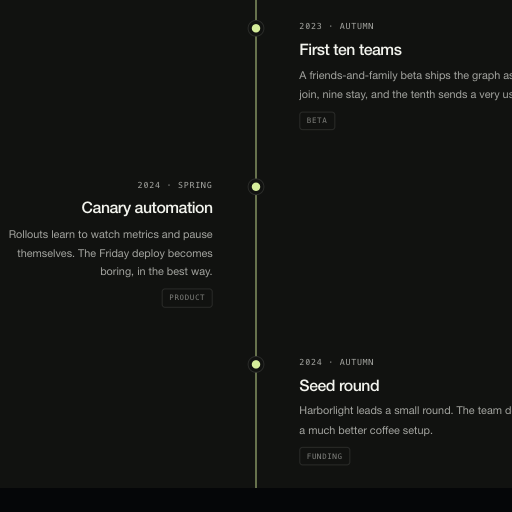
Usage
import { BlockTimeline } from "@/components/BlockTimeline";

export function History() {
  return (
    <BlockTimeline
      title="How we got here."
      events={[
        { date: "2023", title: "First graph", text: "A whiteboard and a cron job." },
        { date: "2025", title: "Replays", text: "One scrubbable timeline." },
      ]}
      {...{
        title: "How we got here.",
        accent: "#d5ed9a",
        scheme: "dark"
      }}
    />
  );
}Implementation notes & API
Purpose: company/product timeline. Copy it, ship it — every string, link and color arrives through props. Runtime: pure DOM + CSS. No WebGPU, canvas, animation library or external assets; SSR-safe on first render. Theming: root custom properties (--vb-bg, --vb-fg, --vb-accent, --vb-border, --vb-radius, --vb-container) or the accent/scheme/className/style props. scheme flips the dark default to light. Guardrails: responsive via container queries down to 320px; interactive behavior degrades on touch; prefers-reduced-motion drops entrance/scroll motion while content stays complete. The rail draws once when the section enters the viewport; reduced motion shows the settled timeline immediately.
| Property | Type | Notes / default |
|---|---|---|
eyebrow / title / description | ReactNode | Section header |
events | readonly TimelineEvent[] | { date, title, text, tags? } |
demoNote | ReactNode | null | Fictional-history marker; pass null with real events |
scheme | "dark" | "light" | dark |
accent | string (hex) | Sets --vb-accent for the whole block |
className / style | string / CSSProperties | Applied to the section root |
children | ReactNode | Replaces the default content entirely |